Quickstart
Generate your first e-invoice with the Rebilix API and validate the result.
On this page
From your ERP to the validation report
Beispiel Studio Berlin bills Musterfirma GmbH for eight hours of software development at €97.00 per hour. You will generate XRechnung RE-000001 for €923.44 including VAT. In the sandbox the invoice number is TEST-RE-000001.
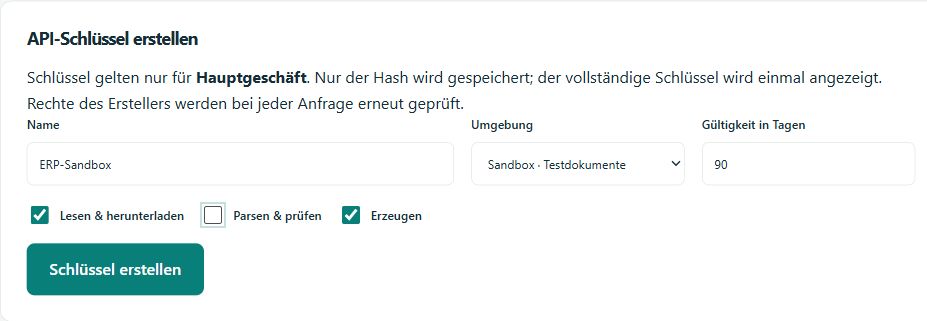
Create sandbox keys
Open as an owner or administrator in the desired workspace Integration → Developer · API & sandboxChoose from Create API key the surrounding area; Sandbox and the rights Generate and Read & downloadStore the key once displayed locally as a secret.
Generate with cURL or Postman
For cURL, load this Invoice as invoice.json Download and open the directory with this file. REBILIX_API_KEY Create a new request ID for each new invoice, keep the ID and file for one repetition.
base="https://app.rebilix.de/api/v1/sandbox"
request_id="$(uuidgen)"
curl --fail-with-body --request POST "$base/documents/generate" \
  --header "Authorization: Bearer $REBILIX_API_KEY" \
  --header "Idempotency-Key: $request_id" \
  --header "Content-Type: application/json" \
  --data-binary @invoice.json
Postman
- Download the Postman collection and import into Postman.
apiKeyas a local secret environment variable, then select that environment.baseUrldefaults to the Rebilix app. - Load a new example invoice saves the sample data and a new request ID. Subsequently Generate XRechnungThe collection takes the document ID from the response.
- Send to: Download original and Download validation reportSave the responses as XML files as needed, and repeat the call only to try the same invoice again.
With C# you can take the same steps in Executable .NET example pass through.
Read response and download files
HTTP 201 means that Rebilix has saved a result, and here you can see an abbreviated excerpt of a real sandbox response. id from your own answer.
{
  "id": "7e742ccd-3187-4774-8a30-92ccc06bf8d0",
  "environment": "sandbox",
  "validationStatus": "valid",
  "invoice": {
    "number": "TEST-RE-000001",
    "net": 776,
    "tax": 147.44,
    "gross": 923.44
  },
  "artifacts": [
    {
      "kind": "original",
      "url": "/api/v1/sandbox/documents/7e742ccd-3187-4774-8a30-92ccc06bf8d0/original"
    },
    {
      "kind": "report",
      "url": "/api/v1/sandbox/documents/7e742ccd-3187-4774-8a30-92ccc06bf8d0/report"
    }
  ]
}
valid means that the technical test rules have been passed. invalid Check the findings and the available report. not_checked It identifies a document that has only been read out, and the API stores a document in the API history, and the invoice book and the email are separate actions.
document_id="<id aus Ihrer Antwort>"
curl --fail "$base/documents/$document_id/original" \
  --header "Authorization: Bearer $REBILIX_API_KEY" --output original.xml
curl --fail "$base/documents/$document_id/report" \
  --header "Authorization: Bearer $REBILIX_API_KEY" --output pruefbericht.xml
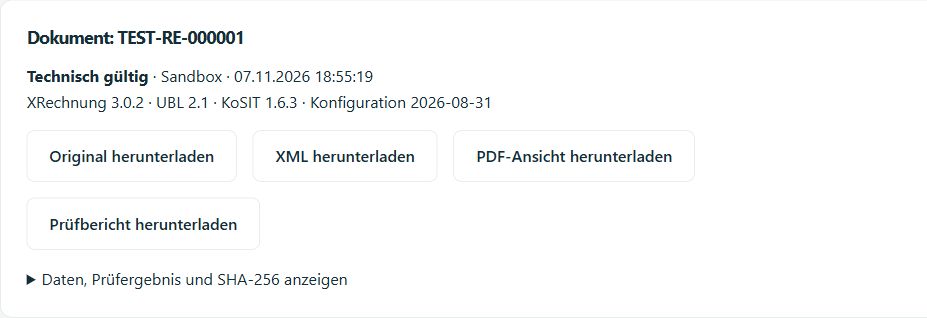
Find the original and validation report in Rebilix
- Open: Integration → Developer · API & sandbox in the workspace to which your key belongs.
- Select under Request history the surrounding area; Sandbox And then they click. Updating.
- In the line for
POST …/documents/generateClick on it Open documentThe document area is directly above the request history. - Underneath Document: TEST-RE-000001 You see status and rule. Download original downloads the XRechnung. Download validation report delivers the report to the same document.