Integrating webhooks
Securely integrate signed notifications into your ERP or application.
On this page
Rebilix sends your server a signed HTTP request as soon as a background job ends, and your server confirms secure reception and then processes the event.
Five Steps to Integration
- Provide a publicly available receiver, for example
https://erp.example.com/webhooks/rebilix. - Open: Integration → Orders and Webhooks, select Sandbox or Live and create the receiver. Maximum of five active receivers per environment.
- Save the once displayed
whsec_…-Secret in the receiver's secret store. - Start a background job and save its job ID to your ERP dataset.
- Check the signature and context, save the event permanently and confirm with 2xx. An ERP worker will then retrieve the current result.
For a complete starting point, use the Executable ASP.NET Core Receiver with SQL Server.
What Your Endpoint Needs to Do
| Requirement | Behaviour |
|---|---|
| HTTPS · Port 443 | Public DNS hostname and valid TLS certificate. No IP literals, credentials, query parameters or URL fragments. |
| POST · application/json | Read original bytes up to a maximum of 64 KiB; do not deserialize or reformat before the signature check. |
| Direct response | The signature authenticates the request, not an ERP browser session. |
| Quickly confirm | Rebilix waits at most 15 seconds for the HTTP response to respond to database commit with 2xx. |
| Publicly available | Private / internal destinations are also blocked after DNS resolution. localhost cannot be registered directly as a recipient. |
Events and Payload
Receive active recipients of the same environment job.succeeded or job.failedIntermediate automatic retries do not trigger a closing event; new recipients do not receive historical events.
{
  "id": "18e7ba7a-7565-4d07-b980-a068d397ff13",
  "type": "job.succeeded",
  "environment": "sandbox",
  "createdAt": "2026-11-01T10:15:00+00:00",
  "version": 1,
  "workspaceId": "11111111-1111-4111-8111-111111111111",
  "jobId": "22222222-2222-4222-8222-222222222222",
  "operation": "validate",
  "state": "succeeded",
  "resultStatus": "valid",
  "documentId": "33333333-3333-4333-8333-333333333333",
  "conversionReviewId": null,
  "errorCode": null
}| Field | Significance |
|---|---|
| id | Event UUID. Remains the same for repeat delivery. |
| Type/State | job.succeeded / succeeded or job.failed / failed. |
| Environment | sandbox or live; must fit the receiver configuration. |
| createdAtt | Time of the terminal event, not the current delivery attempt. |
| Version | Payload scheme, currently 1. treat changes consciously. |
| workspaceId | Workspace of the order. Compare with the expected client. |
| jobId / operation | Order and action: generate, parse, validate or conversion review. |
| resultStatus | valid, invalid, not_checked, ready or blocked; zero for processing errors. |
| documentId | Reference to stored document; otherwise, zero. |
| conversionReviewId | Reference to conversion test; otherwise, zero. |
| errorcode | Technical error code at job.failed; zero if successful. |
Also included resultStatus: invalid or blocked It may be part of a completed order, and the event does not contain invoice files, customer data or API keys.
{
  "id": "9c692ed6-a07b-49a8-aeb6-10a84c749149",
  "type": "job.failed",
  "environment": "sandbox",
  "createdAt": "2026-11-01T10:18:00+00:00",
  "version": 1,
  "workspaceId": "11111111-1111-4111-8111-111111111111",
  "jobId": "22222222-2222-4222-8222-222222222222",
  "operation": "validate",
  "state": "failed",
  "resultStatus": null,
  "documentId": null,
  "conversionReviewId": null,
  "errorCode": "validation_unavailable"
}
Check the signature against the original bytes
| Headers | Purpose |
|---|---|
| X-Rebilix-Event-Id | Stable event ID; after checking, compare with payload.id. |
| X-Rebilix Delivery-Id | Delivery for this event/recipient. For correlation only; do not use as a deduplication key. |
| X-Rebilix timestamp | Unix seconds, reset for each attempt. |
| X-Rebilix signature | v1= followed by 64 hex signs. |
Calculate HMAC-SHA256 over UTF-8 timestamp + "." + eventId + ".", immediately followed by the unchanged JSON bytes. The HMAC key is the exact UTF-8 string whsec_…Do not decode as Hex or Base64.
using Rebilix.Sdk;

// rawBody: begrenzter Request-Body, noch nicht deserialisiert.
bool authentic = RebilixWebhook.Verify(
    rawBody,
    request.Headers["X-Rebilix-Event-Id"].ToString(),
    request.Headers["X-Rebilix-Timestamp"].ToString(),
    request.Headers["X-Rebilix-Signature"].ToString(),
    signingSecret);

if (!authentic)
    return Results.Unauthorized();

// Danach Kontext prüfen und in einer dauerhaften Inbox speichern.
// Vollständiger Receiver: SDK & Beispiele → ZIP herunterladen.
The SDK compares the signature in constant time and allows a maximum of five minutes of time deviation. Keep the server clocks in sync. Only after successful checking does it read JSON and validate Event ID, Workspace, Environment, Version and Event Type.
The delivery ID header does not belong to the signed string; the signed event ID together with the payload is the basis of the processing.
Reliably received and processed
- Signature incorrect / time window expired: Reject with 401, do not change ERP data.
- Valid new event: Store the original payload and event ID in a persistent inbox. A unique database index prevents parallel duplicates.
- Identical already saved event: Return 2xx again, do not perform a second business action.
- Database Commit Failed: A 5xx response allows Rebilix to repeat.
- After the commit: 200 or 204 respond. A worker reads job status and results with an API key and updates the associated ERP dataset.
ERP change and “processed” marking belong in the same transaction. For external impacts, use your own transactional outbox. A background task without permanent storage is not enough.
Events can occur multiple times and in a different order, and manually restarted processing can later receive a new closing event, and read the current job status so that an old failure event does not override a new success.
Service and repetition
| Response / Situation | Rebilix behaviour |
|---|---|
| 2xx | Mark as delivered. |
| Network error, 408, 429, 5xx | Repeat automatically: 30 / 60 / 120 / 240 seconds. Retry after can extend the waiting time up to an hour. |
| Other HTTP status codes | Stop automatic repetition. Repeat, if necessary, expressly after error correction. |
| Connection termination upon receipt | Result may be unknown. Double delivery is possible. |
Up to five attempts per cycle, a total of a maximum of twenty started delivery attempts; there is no Exactly-once or unlimited delivery guarantee; monitor failed delivery.
Underneath Integration → Orders and Webhooks Payload, trial counter, HTTP status and signature header. API offers GET /webhook-deliveries and GET /webhook-deliveries/{id} with reading rights.
POST /webhook-deliveries/{id}/retry Requires all three rights and JSON {"expectedAttempts":5}, not an idempotency key. Use the currently read counter; an obsolete counter delivers 409. Events that have already been successfully delivered are not re-sent.
Sandbox and local capture
Start with a sandbox receiver and a sandbox job. API keys of the ERP worker and expected environment must also use sandbox.
| Operator's configuration | Impact |
|---|---|
| Webhooks:CaptureOnly = true | By default, payload and signature are logged locally, and no DNS or HTTP call, even to sandbox receivers. |
| Webhooks:CaptureOnly = false | Real HTTP delivery, also in development and for sandbox events. |
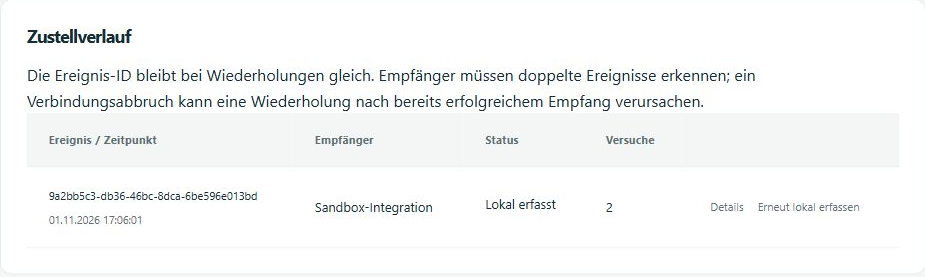
Customer-facing receivers cannot change this Rebilix instance setting, and if you have a hosted instance, clarify it with the operator, and for local development, your receiver needs publicly accessible HTTPS access to the local application.
Deliveries already recorded locally will not be sent automatically after switching. Select expressly "Re-delivery" or create a new order. Mail:CaptureOnly is an independent setting for billing emails.
Safety and life cycle
The signature secret is not an API key. The receiver uses it only for verification; it retrieves documents with a separate API key with read-rights. Use its own configuration and expected workspace ID per environment and tenant.
For a new destination address or a new signature key, disable the recipient and create a replacement. An HTTP request that is already running may end, and only check both secrets for as long as necessary and retain the inbox deduplication.
The authorization of the creator is checked before deliveries. Loss of role, account suspension or changed security stamp can block the recipient. The Rebilix operator must permanently secure the database and data protection key bundle and share it at several instances.
Conversion confirmation, invoice issuance and e-mail are not triggered by webhooks, and the sample receiver only updates a technical status.